As every business is built on teamwork, smooth communication and fast collaboration have become essential. Today, teams share files more than ever, whether it’s financial data, medical records, legal documents, or customer information. This makes secure file sharing a critical priority for every organization. Sharing and converting paper-based data with the help of a data conversion company can play a key role in improving accessibility, visibility, and data protection. When information is digitized and properly secured, businesses can work confidently and maintain complete control over who accesses sensitive content.
Document sharing used to be slow and difficult, with risks of misplaced documents or version errors. But with modern technologies like cloud storage and virtual desktop infrastructure (VDI), organizations can now share files safely, quickly, and easily. Even with these advancements, businesses must remain careful. Every time a file moves from one device to another, there is a chance of exposure or unauthorized access. That’s why secure methods and tools are so important today, especially with the increased focus on business data protection.
Secure File Sharing: What It Means
Sharing files securely goes beyond adding a password to a document. It means the entire process of sending, receiving, storing, and accessing a file is protected from potential risks. This includes encryption, strict access controls, audit logs, and the ability to update or remove permissions at any time.
When files move across teams or departments, there are multiple points where something could go wrong. A secure system helps prevent misuse, misdirection, or interception of data. Instead of depending on manual checks, secure platforms ensure that only approved individuals gain access to the right files at the right time.
How Remote and Hybrid Work Increased Security Risks
Workplaces have changed drastically. Files are no longer passed across desks or stored only in office cabinets. Instead, they are shared online through emails, cloud links, mobile devices, and laptops across multiple locations.
This shift created new challenges:
- Use of personal devices
- Connection to unsecured public networks
- File downloads to local desktops
- Sharing links through unapproved apps
These actions increase the chances of data leaks, cyberattacks, and accidental sharing. Secure file sharing gives teams the tools they need to collaborate efficiently while still protecting sensitive information.
Why Secure File Sharing Is More Essential Than Ever
Remote work trends have made secure digital collaboration more important than ever. Even before the pandemic, many employees worked from home regularly. After the global shift to remote work, digital sharing became the norm. But this also came with increased risks, such as:
- Unsecured devices
- Higher chances of device loss
- Use of insecure sharing tools
- Sensitive files accidentally reaching the wrong people
A single breach can harm customer relationships, disrupt operations, and damage the company’s reputation. That’s why businesses now depend on secure file-sharing tools that offer better control, faster collaboration, and stronger data protection. It also highlights why companies must follow tips to protect sensitive business documents online for better overall security.
Types of Secure File Sharing Systems
Different businesses use different tools based on their needs.
Some of the common options include:
- Email (with secure attachments)
- USB storage devices
- Virtual data rooms (VDRs)
- Basic cloud-sharing tools
- File Transfer Protocol (FTP)
- Project management platforms and collaboration tools
Email and USB drives have been used for years, but they come with clear limitations. Cloud-based and professional collaboration platforms offer better protection and can also support internal and external sharing.
Some common benefits include:
- Secure and fast file transfer
- Access to updated versions
- Smooth team collaboration
- Easy audit and compliance checks
- Reduced administrative costs
Best Practices for Secure File Sharing in Companies
Sharing files online is essential for business, but it also comes with risks. Sensitive data can be exposed, misused, or accessed by the wrong person. That’s why secure file-sharing tools must work as part of a complete security strategy. Here are simple and effective tips to help businesses share files safely.
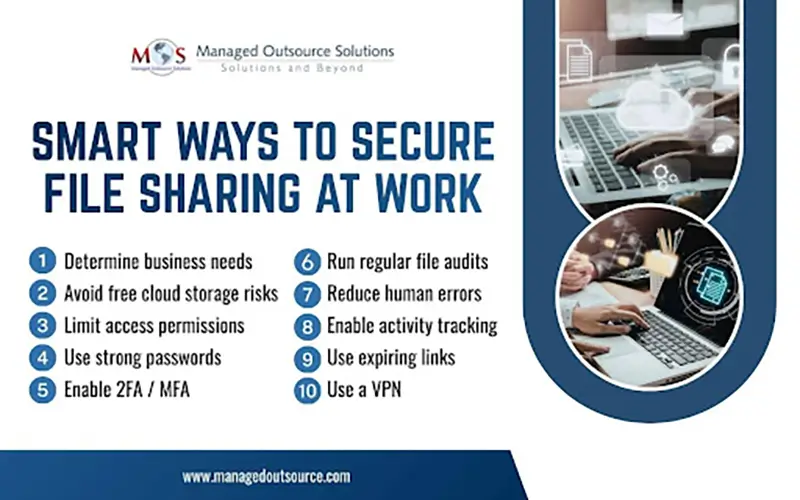
- Determine Your Business Needs
Every business has different file-sharing requirements. For example, sharing confidential documents during an M&A process needs a highly secure platform.
Sharing simple items like employee photos requires far less protection. Identify the type of documents you handle and how important it is to keep them confidential.
Once you know your needs, you can compare tools that match your security level.
- Be Careful with Free Cloud Storage
Free cloud tools are popular, but they are not always safe. Some files could cause serious harm if they fall into the wrong hands.
Paid services offer stronger security features, better control, and long-term protection. If you deal with sensitive data, always choose a secure, professional solution.
- Limit Access Permissions
Access control is simple but often ignored. Give users access only to the files they need. Nothing more. Avoid sharing entire folders or unrestricted access just because someone is trusted.
The fewer accounts that can see the files, the lower the risk of misuse.
Review access regularly. Staff changes and project updates mean permissions should be updated or removed as needed.
- Use Strong Passwords and Good Password Management
Strong passwords are essential for security. Use long, complex passwords with different characters. However, remembering many passwords can lead to weak habits like reusing the same password.
A password manager solves this problem by storing and generating secure passwords. Users only need to remember one master password.
- Enable 2-FA or MFA
Two-factor authentication (2-FA) adds another layer of protection. Besides the password, the user must enter a code sent to a phone or email.
Even if someone steals the password, they cannot access the file without the second verification. Multi-factor authentication (MFA) adds even more steps, such as a PIN or biometric scan, making access even more secure.
- Use a VPN
A virtual private network (VPN) protects data on public or unsecured networks. It creates an encrypted tunnel so files cannot be easily intercepted.
A VPN is especially useful for remote employees. It works alongside file-sharing platform security to provide an extra layer of protection. Some companies also pair VPNs with encrypted file transfer to maximize security.
- Run Regular File Audits
Regularly check the files stored in your system. Delete outdated or unused files to free storage and reduce risk. Only the files needed for daily work should remain. This helps keep your data clean and secure.
- Reduce Human Errors
Human mistakes are the biggest cause of data breaches. Most errors happen because employees are unaware of best practices. Train your staff on how to share files securely.
Teach them how to manage permissions, use password managers, and follow company guidelines. A well-trained team reduces risks more effectively than any single security tool.
- Activity Tracking
Activity tracking uses audit logs to record every action taken on a file. You can see who opened, viewed, edited, or downloaded a document, along with the exact time it happened.
This visibility helps teams detect unusual behavior early. It also creates a clear trail of accountability, which is important for security and compliance.
- Expiring Links
Expiring links give temporary access to files and automatically shut off after a set time. This prevents files from staying accessible longer than necessary. It also reduces risks when working with external vendors, temporary staff, or partners.
Even if the link is shared again, it becomes useless once it expires, adding another layer of protection.
As organizations continue to adopt digital tools, secure file sharing becomes even more vital. Whether you work with confidential customer records, financial documents, or healthcare data, safeguarding sensitive information must be a priority. Digitizing information with the help of a data conversion company ensures that your files are accessible, organized, and protected. By choosing the right file-sharing tools and following smart security practices, businesses can collaborate confidently, reduce risks, and maintain complete control over their data.
Secure your business data today
upgrade your file-sharing strategy now.
Contact us