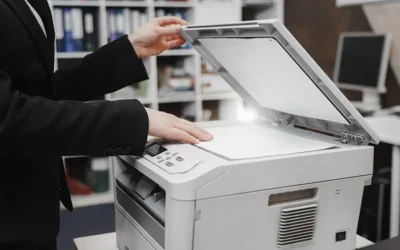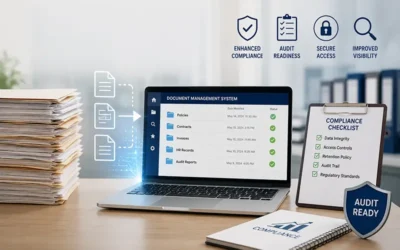
In today’s legal environment, law firms and legal departments manage large volumes of documents such as contracts, case files, pleadings, and evidence records. Converting these paper-based files into digital formats has become essential for efficient legal records management and streamlined case handling. Digitization allows organizations to organize files more efficiently, improve document accessibility, and strengthen data security while supporting faster retrieval and collaboration across legal teams. This is where legal document scanning services play a crucial role, helping law firms handle bulk scanning projects efficiently. These services often use high-speed scanners and automated workflows to process large document volumes quickly.
However, despite the advantages of digitization, many law firms face several challenges in legal document scanning. From poor scan quality to security concerns, these issues can affect productivity and even create legal risks. Understanding these challenges and adopting best practices for scanning legal documents is essential for law firms to improve efficiency and maintain compliance. This post highlights common challenges in scanning legal documents, and provides practical solutions for secure scanning.
The Importance of Legal Document Scanning
Legal practices deal with highly sensitive and complex documentation. Paper-based systems often lead to storage problems, accessibility issues, and increased risk of misplacing important records. Digitizing documents helps law firms create a centralized system where files can be accessed quickly and securely.
Digital records also improve collaboration. Attorneys, paralegals, and clients can access case documents remotely, which accelerates case preparation and decision-making. Additionally, digital storage reduces the risk of losing documents due to disasters such as fire or flood. Despite these advantages, scanning legal documents is not always straightforward. Several technical and operational challenges can arise during the digitization process.
Understanding Common Challenges in Legal Document Scanning
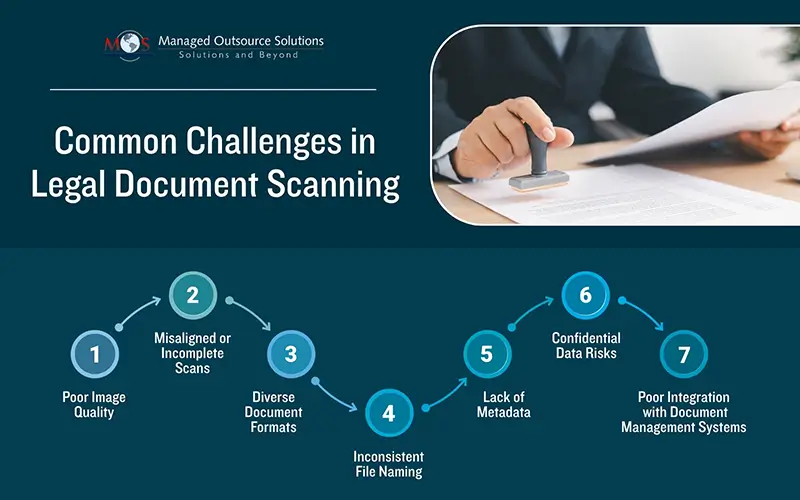
Scanning legal documents is an essential aspect of document management in law firms. However, the process can be challenging and lead to costly mistakes if not implemented correctly. Identifying common mistakes in scanning legal documents can help law firms avoid errors that disrupt workflows and reduce efficiency. Here are the key challenges of legal document scanning:
- Diverse Document Formats: Legal documents rarely follow a single format. They may include typed pages, handwritten notes, signatures, stamps, and diagrams. OCR systems sometimes struggle with these diverse formats, leading to recognition errors. Documents with multiple columns, embedded graphics, or handwritten text can cause scanning software to misinterpret content. Advanced scanning solutions designed for legal workflows should be used to process complex document structures. These tools preserve formatting and improve text recognition accuracy.
- Inconsistent File Naming and Organization: Without standardized naming conventions, locating specific documents can become difficult. Poor organization can slow down case preparation and increase the risk of misplacing files. Establish consistent naming structures that include case numbers, document types, and dates.
- Choosing the Wrong File Format: Selecting an incorrect file format can create compatibility issues. For example, some formats may not preserve document structure or may increase file size unnecessarily. PDF is generally the preferred format for legal documents because it maintains layout consistency and can be easily shared across platforms.
- Lack of Metadata: Metadata improves document searchability by adding details such as client name, case number, or document type. Including metadata during the scanning process helps legal teams quickly locate specific records in large databases.
- Ignoring Version Control: Legal documents often undergo multiple revisions. Without proper version control, outdated versions may accidentally be used in legal proceedings. Implementing version tracking systems ensures that teams always access the most current version of a document.
- Misaligned or Incomplete Scans: Another common issue in document digitization is misaligned pages. Documents may be scanned at an angle or partially cut off, resulting in missing information or improper formatting. Misaligned pages can lead to incorrect pagination and may cause confusion during legal proceedings if critical details are omitted. Before scanning, documents should be properly arranged and aligned in the feeder. Automated scanners with alignment detection can help prevent such errors.
- Poor Image Quality and Resolution: Poor image quality is another common mistake made when scanning legal documents. This can lead to difficulty in reading the documents, as well as issues with accuracy and completeness. To prevent poor image quality, it is important to select the right resolution for the documents and to ensure that the scanner is properly calibrated. If documents are scanned with low resolution or improper settings, the resulting files may appear blurry or difficult to read. Poor image quality can also reduce the accuracy of Optical Character Recognition (OCR) technology, making it harder to extract or search text within scanned documents. Factors such as low contrast, poor lighting, or incorrect resolution can significantly affect OCR accuracy. Law firms should ensure that scanners are properly calibrated and set to appropriate resolution levels. Using high-quality scanning equipment and performing image enhancement techniques like de-skewing and noise reduction can significantly improve scan clarity.
- Incorrect Handling of Confidential Data: Legal documents often contain sensitive information, including financial data, personal records, and confidential case details. Any breach during the scanning or storage process can have serious legal consequences. Unauthorized access, data theft, or accidental disclosure of confidential information can damage a firm’s reputation and lead to compliance violations. Implementing secure legal document scanning practices is essential. Encryption, controlled access permissions, and secure cloud storage systems can help protect sensitive legal information.
- Improper Integration with DMS: Another mistake arises when scanned documents cannot be easily integrated with existing legal records management systems. Without proper integration, scanned files may remain difficult to organize, search, or retrieve. This can create inefficiencies and slow down legal workflows. Law firms should ensure that their scanning solutions are compatible with document management systems. Automated indexing and metadata tagging can make digital files easier to organize and retrieve.
Best Practices for Scanning Legal Documents
Adopting proven strategies to overcome legal document scanning challenges can improve accuracy and efficiency.
- Use High-Quality Scanning Equipment: Modern scanners with advanced image-processing capabilities produce clearer and more accurate digital copies.
- Standardize the Scanning Process: Developing standardized procedures ensures that all staff follow the same workflow for document digitization. These procedures should include: proper document preparation, correct scanning settings and quality control checks.
- Select the Right Resolution: A higher resolution can result in a better-quality image, but it can also result in larger file sizes. Consider the purpose of the document to determine the appropriate resolution.
- Choose the right file format: PDF is the most commonly used file format for legal documents, but other formats such as TIFF or JPEG may be appropriate in certain situations. Consider the software and hardware you are using to determine the best format.
- Implement Secure Access Controls: Maintaining secure legal document scanning practices requires strict access controls. Only authorized personnel should be able to view or modify scanned documents. Multi-factor authentication and encrypted storage can further enhance security.
- Use Automated Indexing and OCR Technology: OCR technology allows scanned documents to become searchable, making it easier for legal professionals to locate key information. Automated indexing tools can also categorize documents based on keywords or metadata, improving organization.
- Use Appropriate Filename Conventions: Develop a consistent naming convention for your scanned legal documents to ensure easy retrieval in the future. Consider including relevant information such as the document type, date, and client name.
- Use Automatic Document Feeders (when possible): Automatic document feeders can save time and help prevent mistakes that can occur when manually placing documents on the scanning bed.
- Preview Documents before Scanning: Preview each document before scanning to ensure that all pages are present and properly aligned. This can help avoid the need to rescan documents that were not properly captured.
- Scan Documents in Batches: Scanning documents in batches can help ensure that you capture all of the pages of each document and save time by reducing the need to switch between documents.
Digitizing legal documents offers significant benefits, including improved accessibility, reduced storage costs, and enhanced workflow efficiency. However, law firms must address the challenges in legal document scanning to fully realize these advantages.
By following the best practices for scanning legal documents accurately, law firms can implement reliable and efficient document management systems. Partnering with professional legal document scanning services can further streamline the digitization process. Ultimately, a well-executed scanning strategy strengthens legal records management, enhances productivity, and ensures that critical legal information remains secure and accessible.
Want to adopt best practices that help overcome common challenges in legal document scanning.